Mostrando entradas con la etiqueta writeup. Mostrar todas las entradas

domingo, 27 de agosto de 2023

Remote VulNyx Writeup

Scanning

We scan the open ports with the nmap tool with scripts and software versions:

Enumeration

We access to web server and we enumerate an Apache Debian default page:

We use to gobuster tool with a dictionary large, we can see the wordpress directory on the server:

We access the source code and see that the website loads a domain name:

We access WordPress and detect software versions deployed on the server:

We enumerate also the administration panel:


We confirm that the user is "tiago", so now we try to do an automated attack with the WPScan tool, but after several minutes we don't get credentials.

I launch nmap with the http-wordpress-enum script, it shows a plugin called "gwolle-gb 1.5.3" which has exploits:


Exploitation

So we mount a PHP file with a webshell so we can execute commands from the URL:

We set a netcat to listen and run a reverse shell with mkfifo:

We get the database connection credentials:

We reused the password on the user "tiago" and managed to read the user flag::

Privilege Escalation

We run sudo -l and see that we can run the "rename" binary as the root user::

We see the binary help:

We see that it has the "Manual" (-m) option, so we press enter until we see that it lets us write, so we try the "classic !sh", we manage to escalate privileges as the root user and read the flag:

sábado, 26 de agosto de 2023

Lesson Learned? TryHackMe Writeup


Scanning

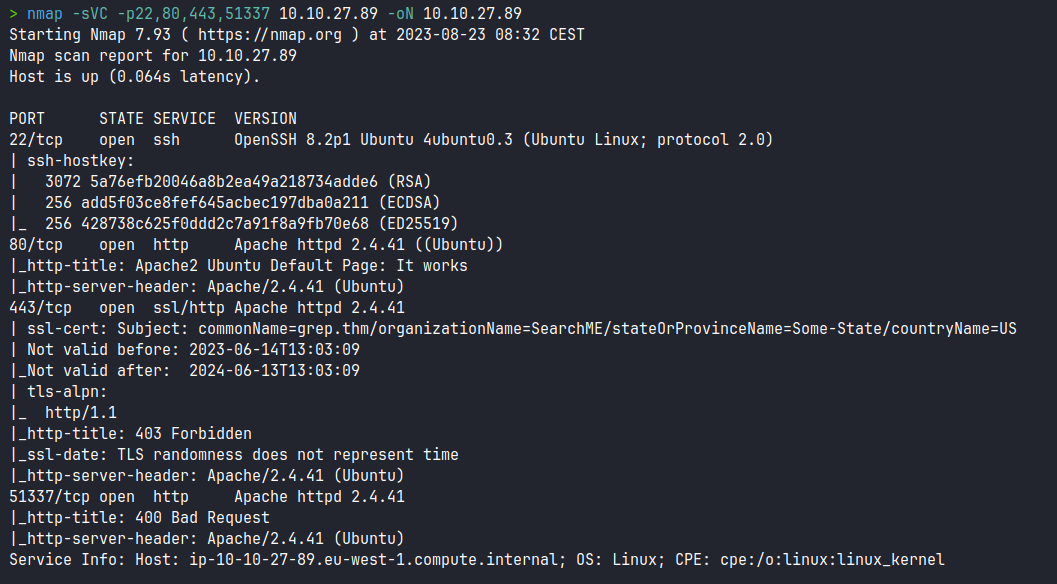
We scan the open ports with the nmap tool, scripts and software versions:


Enumeration

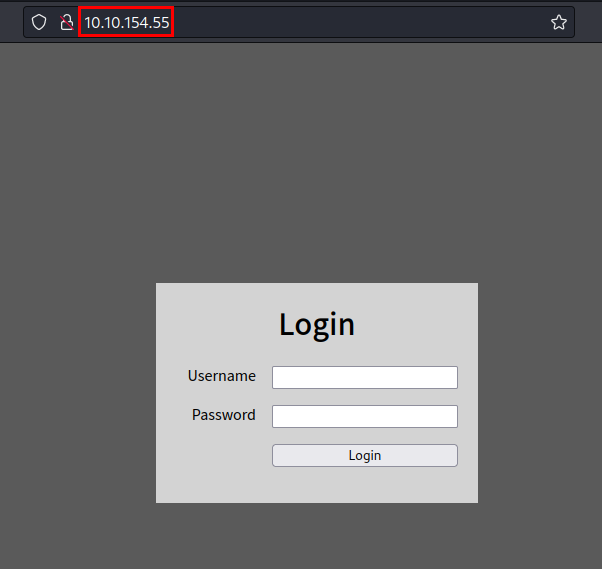
We access the website and we can see a authentication:

We can testing with guessing password, but not working:

We try with login Bypass techniques, we see a SQL Injection protection with "OR" characters, the error message suggests us a "hint" to use techniques that does not require "OR", so we are on the right track...

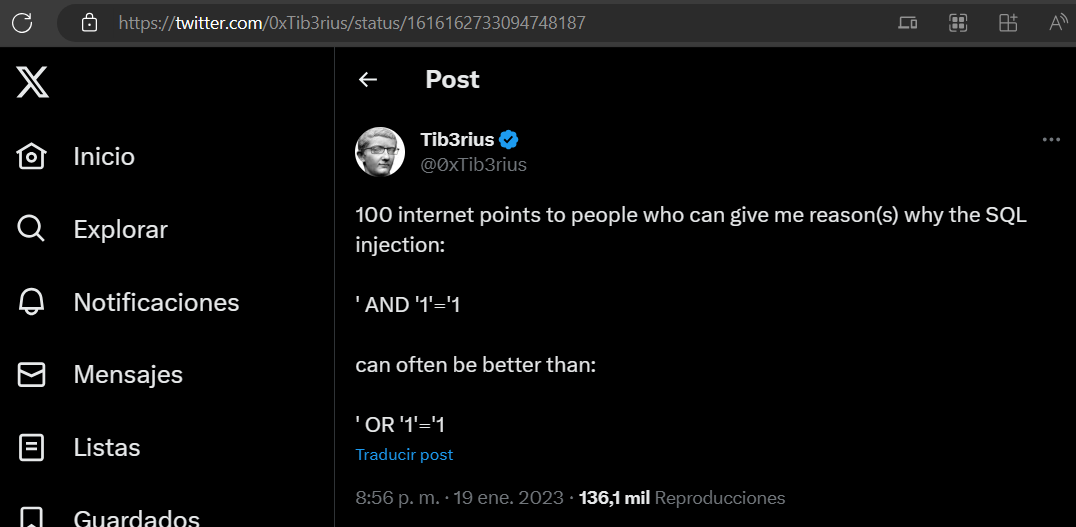
We find to Tib3rius in Twitter, he has post with mentions about to SQL Injection and not uses "OR" parameter:

Exploitation

We try different payloads, we use 1' union select ''# , we successfully to bypass the authentication and we see the flag:

martes, 22 de agosto de 2023

sábado, 27 de mayo de 2023

Valley TryHackMe Writeup

logo

Scanning

We scan the open ports with the nmap tool with scripts and software versions.

nmap -p22,80,37370 10.10.140.77 -sVC -oN nmap.txt
Starting Nmap 7.93 ( https://nmap.org ) at 2023-05-27 10:32 CEST
Nmap scan report for 10.10.140.77
Host is up (0.049s latency).

PORT      STATE SERVICE VERSION
22/tcp    open  ssh     OpenSSH 8.2p1 Ubuntu 4ubuntu0.5 (Ubuntu Linux; protocol 2.0)
| ssh-hostkey: 
|   3072 c2842ac1225a10f16616dda0f6046295 (RSA)
|   256 429e2ff63e5adb51996271c48c223ebb (ECDSA)
|_  256 2ea0a56cd983e0016cb98a609b638672 (ED25519)
80/tcp    open  http    Apache httpd 2.4.41 ((Ubuntu))
|_http-server-header: Apache/2.4.41 (Ubuntu)
|_http-title: Site doesn't have a title (text/html).
37370/tcp open  ftp     vsftpd 3.0.3
Service Info: OSs: Linux, Unix; CPE: cpe:/o:linux:linux_kernel

sábado, 20 de mayo de 2023

Weasel TryHackMe Writeup

logo

Scanning

We scan the open ports with the nmap tool with scripts and software versions.

> nmap -sVC 10.10.81.101
Starting Nmap 7.93 ( https://nmap.org ) at 2023-05-20 10:57 CEST
Nmap scan report for 10.10.81.101
Host is up (0.050s latency).
Not shown: 994 closed tcp ports (conn-refused)
PORT     STATE SERVICE       VERSION
22/tcp   open  ssh           OpenSSH for_Windows_7.7 (protocol 2.0)
| ssh-hostkey: 
|   2048 2b17d88a1e8c99bc5bf53d0a5eff5e5e (RSA)
|   256 3cc0fdb5c157ab75ac8110aee298120d (ECDSA)
|_  256 e9f030bee6cfeffe2d1421a0ac457b70 (ED25519)
135/tcp  open  msrpc         Microsoft Windows RPC
139/tcp  open  netbios-ssn   Microsoft Windows netbios-ssn
445/tcp  open  microsoft-ds?
3389/tcp open  ms-wbt-server Microsoft Terminal Services
| rdp-ntlm-info: 
|   Target_Name: DEV-DATASCI-JUP
|   NetBIOS_Domain_Name: DEV-DATASCI-JUP
|   NetBIOS_Computer_Name: DEV-DATASCI-JUP
|   DNS_Domain_Name: DEV-DATASCI-JUP
|   DNS_Computer_Name: DEV-DATASCI-JUP
|   Product_Version: 10.0.17763
|_  System_Time: 2023-05-20T08:57:46+00:00
| ssl-cert: Subject: commonName=DEV-DATASCI-JUP
| Not valid before: 2023-03-12T11:46:50
|_Not valid after:  2023-09-11T11:46:50
|_ssl-date: 2023-05-20T08:57:54+00:00; -1s from scanner time.
8888/tcp open  http          Tornado httpd 6.0.3
| http-title: Jupyter Notebook
|_Requested resource was /login?next=%2Ftree%3F
| http-robots.txt: 1 disallowed entry 
|_/ 
|_http-server-header: TornadoServer/6.0.3
Service Info: OS: Windows; CPE: cpe:/o:microsoft:windows

Host script results:
| smb2-security-mode: 
|   311: 
|_    Message signing enabled but not required
| smb2-time: 
|   date: 2023-05-20T08:57:51
|_  start_date: N/A

Enumeration

Accessing the only web service through port 8888, we find the Jupyter Notebook 6.0.3 software.

domingo, 14 de mayo de 2023

Prioritise TryHackMe Writeup

logo

Scanning

We scan the open ports with the nmap tool with scripts and software versions.

> nmap -sVC -p- --min-rate 5000 prioritise.thm -Pn -n -oN nmap-prioritise.thm
Starting Nmap 7.93 ( https://nmap.org ) at 2023-05-14 21:15 CEST
WARNING: Service 10.10.247.170:80 had already soft-matched rtsp, but now soft-matched sip; ignoring second value
Nmap scan report for prioritise.thm (10.10.247.170)
Host is up (0.055s latency).
Not shown: 65533 closed tcp ports (conn-refused)
PORT   STATE SERVICE VERSION
22/tcp open  ssh     OpenSSH 8.2p1 Ubuntu 4ubuntu0.5 (Ubuntu Linux; protocol 2.0)
| ssh-hostkey: 
|   3072 51fe13747bbc526a883d21d1b3bf13ad (RSA)
|   256 73fef7fdedf492bde2997188f855b28f (ECDSA)
|_  256 f848693d7f199f03166337369f84a87a (ED25519)
80/tcp open  rtsp
| fingerprint-strings: 
|   FourOhFourRequest: 
|     HTTP/1.0 404 NOT FOUND
|     Content-Type: text/html; charset=utf-8
|     Content-Length: 232
|     <!DOCTYPE HTML PUBLIC "-//W3C//DTD HTML 3.2 Final//EN">
|     <title>404 Not Found</title>
|     <h1>Not Found</h1>
|     <p>The requested URL was not found on the server. If you entered the URL manually please check your spelling and try again.</p>
|   GetRequest: 
|     HTTP/1.0 200 OK
|     Content-Type: text/html; charset=utf-8
|     Content-Length: 5082
|     <!DOCTYPE html>
|     <html lang="en">
|     <head>
|     <meta charset="utf-8" />
|     <meta
|     name="viewport"
|     content="width=device-width, initial-scale=1, shrink-to-fit=no"
|     <link
|     rel="stylesheet"
|     href="../static/css/bootstrap.min.css"
|     crossorigin="anonymous"
|     <link
|     rel="stylesheet"
|     href="../static/css/font-awesome.min.css"
|     crossorigin="anonymous"
|     <link
|     rel="stylesheet"
|     href="../static/css/bootstrap-datepicker.min.css"
|     crossorigin="anonymous"
|     <title>Prioritise</title>
|     </head>
|     <body>
|     <!-- Navigation -->
|     <nav class="navbar navbar-expand-md navbar-dark bg-dark">
|     <div class="container">
|     class="navbar-brand" href="/"><span class="">Prioritise</span></a>
|     <button
|     class="na
|   HTTPOptions: 
|     HTTP/1.0 200 OK
|     Content-Type: text/html; charset=utf-8
|     Allow: HEAD, GET, OPTIONS
|     Content-Length: 0
|   RTSPRequest: 
|     RTSP/1.0 200 OK
|     Content-Type: text/html; charset=utf-8
|     Allow: HEAD, GET, OPTIONS
|_    Content-Length: 0
|_rtsp-methods: ERROR: Script execution failed (use -d to debug)
|_http-title: Prioritise

Enumeration

We access the website, no credentials are required and we can create and order items.

domingo, 7 de mayo de 2023

Capture TryHackMe Writeup


Scanning

We scan the open ports with the nmap tool with scripts and software versions.

 > nmap -sVC -p- --min-rate 5000 10.10.183.73 -Pn -n -oN nmap-10.10.183.73.txt  
 Starting Nmap 7.93 ( https://nmap.org ) at 2023-05-07 22:10 CEST  
 Nmap scan report for 10.10.183.73  
 Host is up (0.058s latency).  
 Not shown: 65534 closed tcp ports (conn-refused)  
 PORT  STATE SERVICE VERSION  
 80/tcp open http  Werkzeug/2.2.2 Python/3.8.10  
 | http-title: Site doesn't have a title (text/html; charset=utf-8).  
 |_Requested resource was /login  
 | fingerprint-strings:   
 |  FourOhFourRequest:   
 |   HTTP/1.1 404 NOT FOUND  
 |   Server: Werkzeug/2.2.2 Python/3.8.10  
 |   Date: Sun, 07 May 2023 20:11:27 GMT  
 |   Content-Type: text/html; charset=utf-8  
 |   Content-Length: 207  
 |   Connection: close  
 |   <!doctype html>  
 |   <html lang=en>  
 |   <title>404 Not Found</title>  
 |   <h1>Not Found</h1>  
 |   <p>The requested URL was not found on the server. If you entered the URL manually please check your spelling and try again.</p>  
 |  GetRequest:   
 |   HTTP/1.1 302 FOUND  
 |   Server: Werkzeug/2.2.2 Python/3.8.10  
 |   Date: Sun, 07 May 2023 20:11:22 GMT  
 |   Content-Type: text/html; charset=utf-8  
 |   Content-Length: 199  
 |   Location: /login  
 |   Connection: close  
 |   <!doctype html>  
 |   <html lang=en>  
 |   <title>Redirecting...</title>  
 |   <h1>Redirecting...</h1>  
 |   <p>You should be redirected automatically to the target URL: <a href="/login">/login</a>. If not, click the link.  
 |  HTTPOptions:   
 |   HTTP/1.1 200 OK  
 |   Server: Werkzeug/2.2.2 Python/3.8.10  
 |   Date: Sun, 07 May 2023 20:11:22 GMT  
 |   Content-Type: text/html; charset=utf-8  
 |   Allow: HEAD, GET, OPTIONS  
 |   Content-Length: 0  
 |   Connection: close  
 |  RTSPRequest:   
 |   <!DOCTYPE HTML PUBLIC "-//W3C//DTD HTML 4.01//EN"  
 |   "http://www.w3.org/TR/html4/strict.dtd">  
 |   <html>  
 |   <head>  
 |   <meta http-equiv="Content-Type" content="text/html;charset=utf-8">  
 |   <title>Error response</title>  
 |   </head>  
 |   <body>  
 |   <h1>Error response</h1>  
 |   <p>Error code: 400</p>  
 |   <p>Message: Bad request version ('RTSP/1.0').</p>  
 |   <p>Error code explanation: HTTPStatus.BAD_REQUEST - Bad request syntax or unsupported method.</p>  
 |   </body>  
 |_  </html>  
 |_http-server-header: Werkzeug/2.2.2 Python/3.8.10  

sábado, 8 de abril de 2023

BroScience HackTheBox Writeup

Scanning

We launch nmap tool with scripts and versions on all ports.

PORT    STATE SERVICE  VERSION
22/tcp  open  ssh      OpenSSH 8.4p1 Debian 5+deb11u1 (protocol 2.0)
| ssh-hostkey: 
|   3072 df17c6bab18222d91db5ebff5d3d2cb7 (RSA)
|   256 3f8a56f8958faeafe3ae7eb880f679d2 (ECDSA)
|_  256 3c6575274ae2ef9391374cfdd9d46341 (ED25519)
80/tcp  open  http     Apache httpd 2.4.54
|_http-server-header: Apache/2.4.54 (Debian)
|_http-title: Did not follow redirect to https://broscience.htb/
443/tcp open  ssl/http Apache httpd 2.4.54 ((Debian))
| http-cookie-flags: 
|   /: 
|     PHPSESSID: 
|_      httponly flag not set
| ssl-cert: Subject: commonName=broscience.htb/organizationName=BroScience/countryName=AT
| Not valid before: 2022-07-14T19:48:36
|_Not valid after:  2023-07-14T19:48:36
|_http-title: BroScience : Home
| tls-alpn: 
|_  http/1.1
|_ssl-date: TLS randomness does not represent time
|_http-server-header: Apache/2.4.54 (Debian)
Service Info: Host: broscience.htb; OS: Linux; CPE: cpe:/o:linux:linux_kernel

We see that nmap shows us the domain broscience.htb, so we include it in our /etc/hosts file.

sábado, 21 de enero de 2023

sábado, 14 de enero de 2023

Shoppy HackTheBox Writeup


Scanning

We performed an nmap scan of all ports, including scripts and software versions. We list the domain "shoppy.htb" in the nmap information.


Enumeration

We put the domain "shoppy.htb" in our "/etc/hosts" file and access the website, inside we see a kind of countdown to present the beta of their software.


We launched dirsearch and discovered some interesting routes:


On the other hand, we access the port 9093 resource, we see a kind of plugins playbooks log:


Exploitation

But let's go by parts, we continue with the port 80 service, we access an authentication panel of a software called "Shoppy".


Tests on the authentication panel, attempt to bypass the login and we see that we can access with the following payload in user and password "'||'2'||'".


We try to set default users as "admin", we see that it exists and it creates a file to download.


If we click on it, we see that it exports a json file with the user's hashed credentials:


Now we try to search for users, since there are no other options, but something tells me that we are going to have to fuzz with a dictionary of user names:


We launch an enumeration of users with wfuzz and we see that valid users are appearing:


We reviewed the information of the user "Josh":


We try to get the password from hashes.com and see that we can get the password in plain text:


We try to use the credentials on the SSH service, but we see that they don't work, so we must be missing some other web service to enumerate.

So we try to enumerate subdomains under "shoppy.htb" with the wfuzz tool and enumerate the subdomain "mattermost.shoppy.htb":


Other panel enumerate:


We access with the credentials and find that credentials are being shared through a "Mattermost" channel:


We access by SSH, list the files, read the user flag and see that we can execute a binary called "password-manager" with the user "deploy":


Privilege Escalation

If we try to run the binary, we see that it asks for credentials. So I ran a "strings" on the path of the binary and saw that it internally tries to read a file that is supposed to contain the valid credentials.


But we do not have access to read the file "creds.txt":


We review the permissions and files that exist in the folder of the user "deploy":


We try to "cat" binary over the "password-manager" file and we see that a string that could be the password is being leaked:


We test the password and obtain the credentials of the "deploy" user:


We authenticate as the "deploy" user and see that we are in relevant groups to read files or do privilege escalations:


So we don't complicate things, we run docker to raise a shell and we manage to read the root flag.